LLMInferenceService Architecture Deep Dive
The LLMInferenceService CRD is purpose-built for large language model workloads. Unlike the standard InferenceService, it exposes primitives for KV-cache offloading, prefix-aware routing, disaggregated prefill/decode serving, and fine-grained GPU scheduling — capabilities that become critical at scale. Read this if you're running LLMs in production and need to optimize throughput, reduce latency, or manage multi-node deployments.
Prerequisites: Familiarity with core concepts and configuration is recommended.
System Architecture Overview
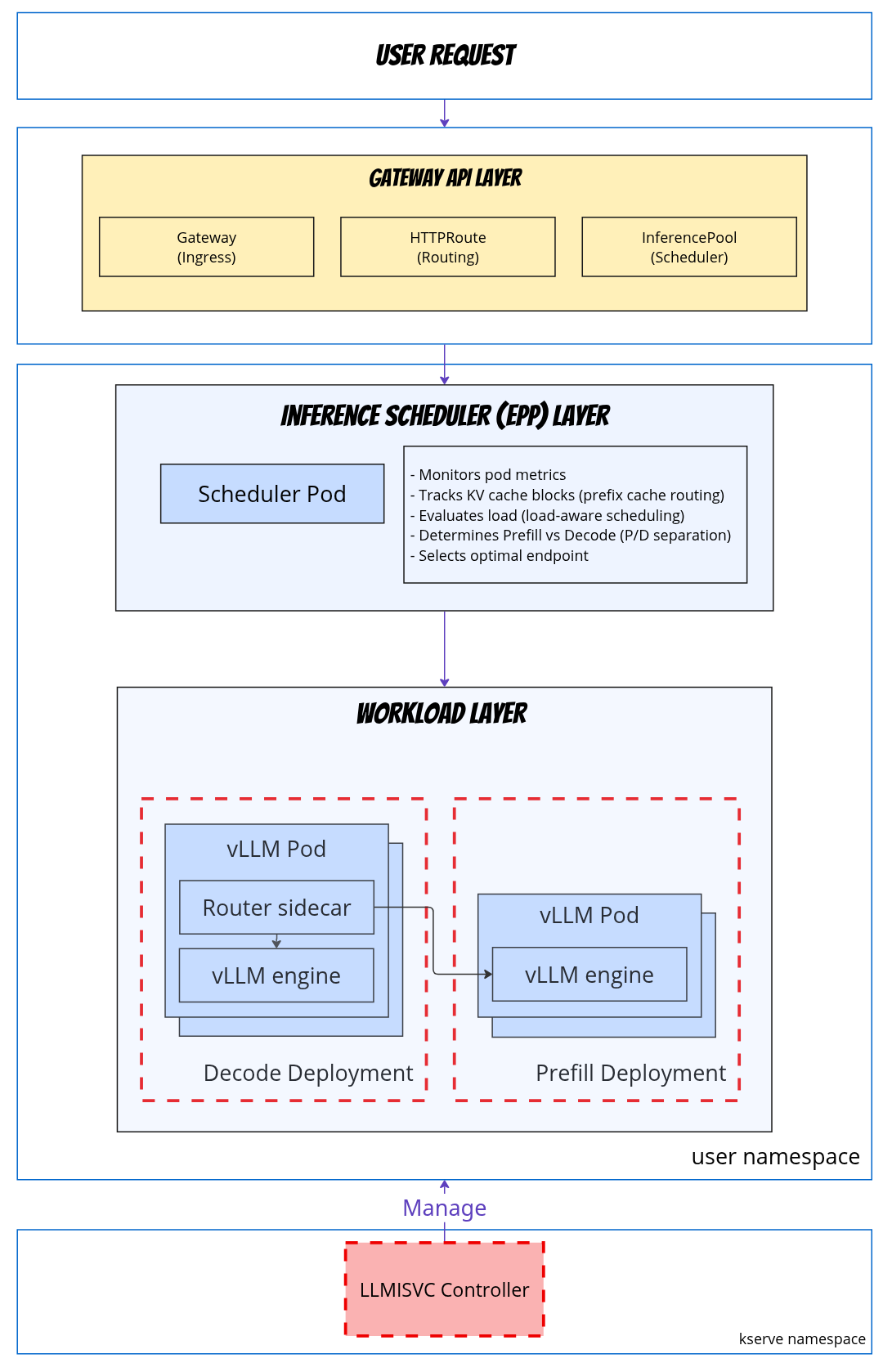
Gateway Architecture
What is a Gateway?
A Gateway is the entry point for external traffic into the Kubernetes cluster. It's a Kubernetes Gateway API resource that:
- Defines listeners (HTTP, HTTPS, ports)
- Configures TLS termination
- Managed by a Gateway Provider (Envoy Gateway, Istio, etc.)
- Can be cluster-scoped or namespace-scoped
Managed vs Referenced Gateway
Managed Gateway (Default)
spec:
  router:
    gateway: {}  # KServe creates Gateway automatically
What KServe creates
apiVersion: gateway.networking.k8s.io/v1
kind: Gateway
metadata:
  name: llama-3-8b-kserve-gateway
  namespace: default
spec:
  gatewayClassName: eg  # Default: Envoy Gateway
  listeners:
    - name: http
      port: 80
      protocol: HTTP
Referenced Gateway (Existing)
spec:
  router:
    gateway:
      refs:
        - name: my-custom-gateway
          namespace: istio-system
Use case: Shared gateway across multiple services.
HTTPRoute Architecture
What is an HTTPRoute?
An HTTPRoute defines path-based routing rules that connect Gateways to backend services (InferencePools or Services).
Managed HTTPRoute (Default)
spec:
  router:
    route: {}  # KServe creates HTTPRoute automatically
What KServe creates
apiVersion: gateway.networking.k8s.io/v1
kind: HTTPRoute
metadata:
  name: llama-3-8b-kserve-route
  namespace: default
spec:
  parentRefs:
    - name: llama-3-8b-kserve-gateway
  rules:
    - backendRefs:
        - group: inference.networking.x-k8s.io
          kind: InferencePool
          name: llama-3-8b-inference-pool
Routing Flow
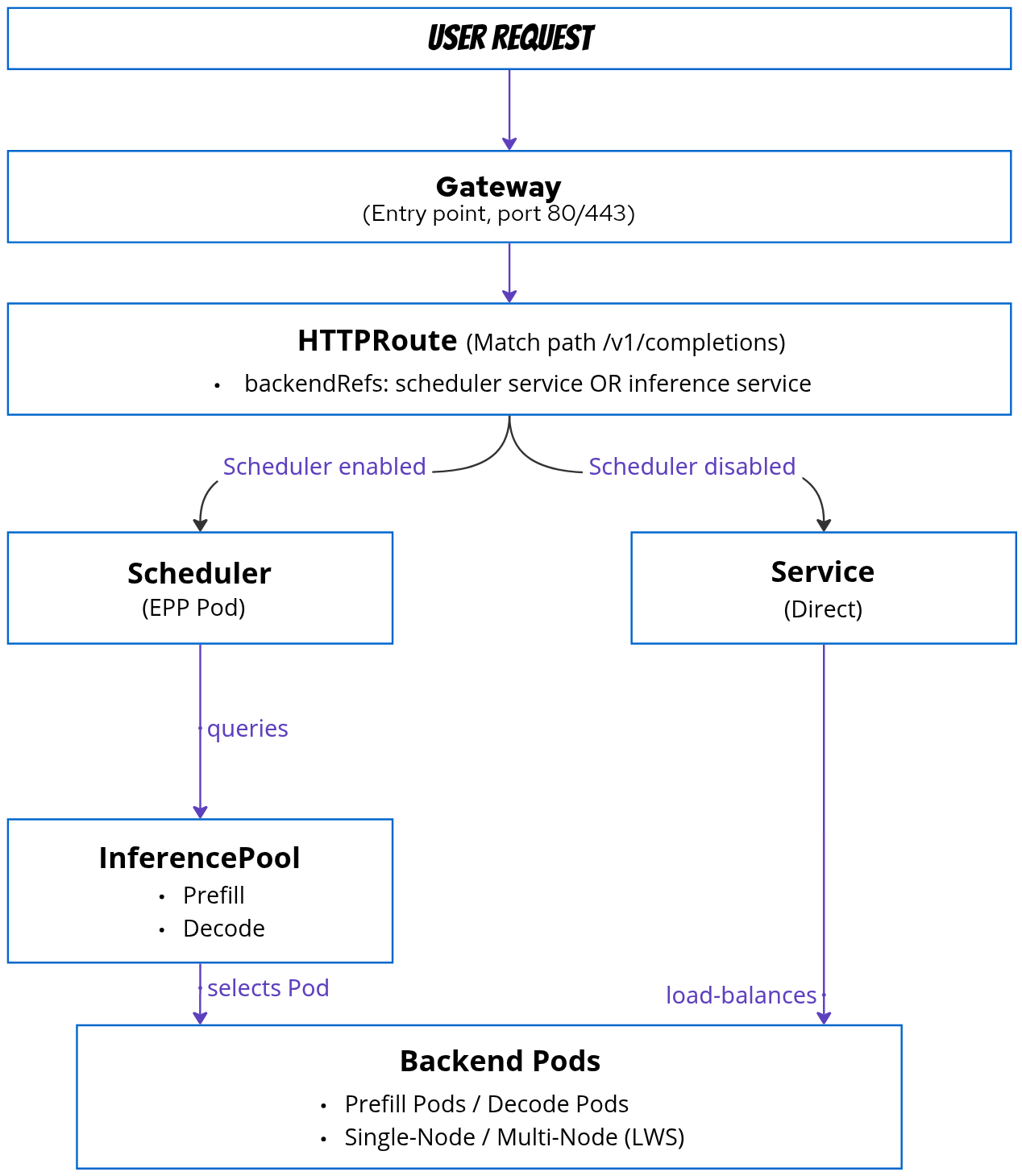
Scheduler Architecture
Overview
The Scheduler (also called Endpoint Picker Pod - EPP) provides intelligent request routing based on:
- Prefix cache: Routes to pods with matching KV cache blocks
- Load: Balances requests across available endpoints
- Prefill-Decode separation: Routes to appropriate pool
Scoring Mechanism
The scheduler tracks KV cache blocks via ZMQ events from vLLM pods:
- BlockStored: Cache block created (includes block hash, tokens, storage location)
- BlockRemoved: Cache block evicted from memory
These events populate an index mapping {ModelName, BlockHash} → {PodID, DeviceTier}, allowing the scheduler to track which pods hold which cache blocks.
For each incoming request, the scheduler calculates a weighted score across all endpoints using pluggable scorers:
| Scorer | Weight | Purpose |
|---|---|---|
| Prefix cache scorer | 2.0 | Prioritizes pods with matching KV cache blocks |
| Load-aware scorer | 1.0 | Balances requests across endpoints |
| Queue scorer | (configurable) | Routes based on queue depth |
The request is routed to the highest-scoring pod, optimizing for both cache hit rate and load distribution.
Scheduler vs No Scheduler
| Feature | No Scheduler | With Scheduler |
|---|---|---|
| Routing | Kubernetes Service (kube-proxy) | InferencePool (EPP) |
| Load Balancing | Round-robin | Intelligent (load-aware, cache-aware) |
| Prefix Cache | ❌ | ✅ Routes to pods with matching KV cache |
| Prefill-Decode | ❌ | ✅ Automatic pool selection |
| Resource Overhead | Minimal (no extra pods) | Low (1 scheduler pod) |
| Use Case | Simple/Dev | Production |
Request Flow Analysis
Standard Request Flow
1. Client sends request
              │
              ▼
2. Gateway receives (port 80/443)
              │
              ▼
3. HTTPRoute matches path (/v1/completions)
              │
              ▼
4. Routes to InferencePool
              │
              ▼
5. Gateway queries EPP Service
   "Which endpoint should I use?"
              │
              ▼
6. EPP evaluates:
   - Prefix cache match (weight: 2.0)
   - Current load (weight: 1.0)
              │
              ▼
7. EPP returns selected endpoint
   "Use Pod 2 (10.0.1.42:8000)"
              │
              ▼
8. Gateway forwards to Pod 2
              │
              ▼
9. Pod 2 processes inference
              │
              ▼
10. Response flows back to client
Prefill-Decode Request Flow
1. Client sends NEW request (no KV cache)
                  │
                  ▼
2. Gateway -> HTTPRoute -> InferencePool
                  │
                  ▼
3. EPP: "Calculate Score to decide which pod is the best to take this new request" → Route to Decode Pool
                  │
                  ▼
4. Routing container (in selected Decode Pod) forwards request to Prefill Pod, which processes prompt and generates KV cache
                  │
                  ▼
5. KV cache transferred to Decode Pod via RDMA if it needs
                  │
                  ▼
6. Response includes KV transfer metadata
                  │
                  ▼
7. Client sends CONTINUATION request (with KV cache ID)
                  │
                  ▼
8. EPP: Calculate score (detects KV cache match on Decode Pod, skips Prefill) → Route directly to Decode Pod
                  │
                  ▼
9. Decode Pod uses transferred KV cache
                  │
                  ▼
10. Token-by-token generation
Network Flow
KV Cache Communication
LLM serving requires two types of KV cache communication:
1. KV Cache Event Tracking (ZMQ)
Purpose: Real-time monitoring of KV cache blocks for intelligent routing
- Protocol: ZMQ (Zero Message Queue) over TCP/IP
- Usage: vLLM publishes events when cache blocks are created/evicted
- Consumer: Scheduler (EPP) tracks which pods have which cache blocks (see Scoring Mechanism)
Configuration:
spec:
  template:
    containers:
      - name: main
        env:
          - name: VLLM_ADDITIONAL_ARGS
            value: "--kv-events-config '{\"enable_kv_cache_events\":true,\"publisher\":\"zmq\",\"endpoint\":\"tcp://scheduler:5557\",\"topic\":\"kv@${POD_IP}@model\"}'"
2. KV Cache Data Transfer (NixlConnector)
Purpose: Actual KV cache block transfer for prefill-decode separation
- Protocol: NixlConnector (RDMA-based, RoCE network)
- Usage: Transfer KV cache blocks from prefill pods to decode pods
- Use Case: Disaggregated prefill-decode architecture
Configuration:
spec:
  template:
    containers:
      - name: main
        env:
          - name: KSERVE_INFER_ROCE
            value: "true"
          - name: VLLM_ADDITIONAL_ARGS
            value: "--kv_transfer_config '{\"kv_connector\":\"NixlConnector\",\"kv_role\":\"kv_both\"}'"
Advanced Patterns
Pattern: Multi-Node Prefill-Decode
Combining P/D separation with LeaderWorkerSet:
spec:
  # Decode workload (multi-node)
  parallelism:
    tensor: 4
    data: 8
    dataLocal: 4
  template:
    containers:
      - name: main
        resources:
          limits:
            nvidia.com/gpu: "4"
  worker:
    containers:
      - name: main
        resources:
          limits:
            nvidia.com/gpu: "4"

  # Prefill workload (multi-node)
  prefill:
    parallelism:
      tensor: 4
      data: 16
      dataLocal: 8
    template:
      containers:
        - name: main
          resources:
            limits:
              nvidia.com/gpu: "8"
    worker:
      containers:
        - name: main
          resources:
            limits:
              nvidia.com/gpu: "8"
Result:
- Prefill: 2 LWS replicas (16/8), each with 8 GPUs
- Decode: 2 LWS replicas (8/4), each with 4 GPUs
- Total: 24 GPUs
Next Steps
- Configuration Guide: Detailed spec reference
- Dependencies: Install required components