LLMInferenceService Configuration Guide
This guide provides detailed reference for configuring LLMInferenceService resources, including model specifications, workload patterns, router settings, and parallelism strategies.
Prerequisites: Before configuring LLMInferenceService, ensure you understand the core concepts and have installed required dependencies.
Configuration Composition Model
For a detailed look at how config composition works internally - including the well-known config catalog, injection decision logic, and field provenance examples - see the Config Composition Deep Dive.
LLMInferenceService vs LLMInferenceServiceConfig
Similar to the relationship between InferenceService and ServingRuntime, KServe introduces LLMInferenceServiceConfig to separate configuration templates from service instances. However, the relationship and purpose differ significantly:
Comparison with InferenceService & ServingRuntime
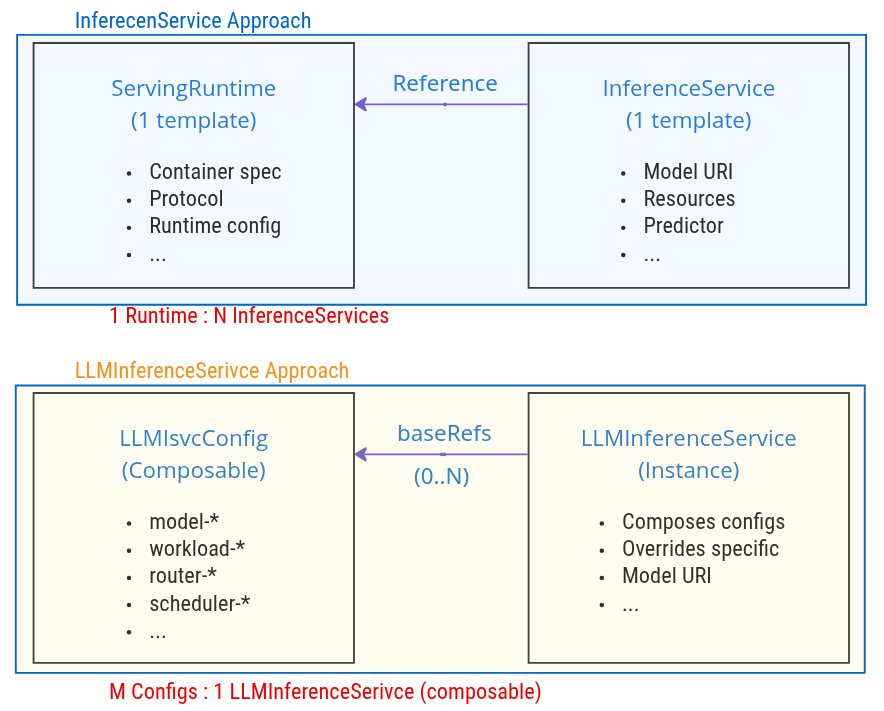
Key Differences
| Aspect | ServingRuntime → InferenceService | LLMISVCConfig → LLMInferenceService |
|---|---|---|
| Relationship | 1:N (One runtime, many services) | M:1 (Many configs, one service via composition) |
| Purpose | Runtime environment definition | Composable configuration fragments |
| Scope | Container, protocol, runtime settings | Model, workload, router, scheduler configs |
| Composition | Single runtime reference | Multiple baseRefs composition |
| Override | Limited (model URI, resources) | Flexible (any field can be overridden) |
| Granularity | Monolithic runtime definition | Modular, category-based configs |
Configuration Composition Example
# Config 1: Model configuration
apiVersion: serving.kserve.io/v1alpha1
kind: LLMInferenceServiceConfig
metadata:
  name: model-llama-3-8b
  namespace: kserve
spec:
  model:
    uri: hf://meta-llama/Llama-3.1-8B-Instruct
    name: meta-llama/Llama-3.1-8B-Instruct

---
# Config 2: Workload configuration
apiVersion: serving.kserve.io/v1alpha1
kind: LLMInferenceServiceConfig
metadata:
  name: workload-single-gpu
  namespace: kserve
spec:
  replicas: 3
  template:
    containers:
      - name: main
        resources:
          limits:
            nvidia.com/gpu: "1"

---
# Config 3: Router configuration
apiVersion: serving.kserve.io/v1alpha1
kind: LLMInferenceServiceConfig
metadata:
  name: router-managed
  namespace: kserve
spec:
  router:
    route: {}
    gateway: {}
    scheduler: {}

---
# LLMInferenceService: Compose all configs
apiVersion: serving.kserve.io/v1alpha1
kind: LLMInferenceService
metadata:
  name: my-llama-service
  namespace: default
spec:
  baseRefs:
    - name: model-llama-3-8b
    - name: workload-single-gpu
    - name: router-managed
  # Optional: Override specific fields
  replicas: 5  # Override workload-single-gpu replicas
Model Specification
Basic Configuration
spec:
  model:
    uri: hf://meta-llama/Llama-3.1-8B-Instruct  # Model source
    name: meta-llama/Llama-3.1-8B-Instruct      # Model name for API
Key Fields
| Field | Type | Description | Example |
|---|---|---|---|
uri | string | Model location | hf://meta-llama/Llama-3.1-8B-Instructs3://my-bucket/models/llama-3pvc://model-pvc/llama-3 |
name | string | Model identifier for inference requests | meta-llama/Llama-3.1-8B-Instruct(defaults to metadata.name) |
LoRA Adapter Configuration
LLMInferenceService supports Low-Rank Adaptation (LoRA) adapters for task-specific model fine-tuning. LoRA allows you to serve multiple adapted versions of a base model efficiently, reducing storage and memory requirements while enabling multi-tenant deployments.
Quick Example
spec:
  model:
    uri: hf://Qwen/Qwen2.5-7B-Instruct
    name: Qwen/Qwen2.5-7B-Instruct
    lora:
      adapters:
        - name: sql-adapter
          uri: hf://my-org/qwen-sql-lora
        - name: code-adapter
          uri: s3://my-bucket/adapters/code-lora
        - name: domain-adapter
          uri: pvc://adapter-pvc/domain-lora
Supported URI Schemes
hf://- HuggingFace Hub adapterss3://- S3-compatible storage (AWS S3, MinIO, Ceph)pvc://- PersistentVolumeClaim (pre-downloaded, air-gapped)
Key Benefits
- Storage Efficiency: 50-500MB per adapter vs 10-100GB for full models
- Multi-Tenancy: Multiple task-specific models from a single deployment
- Dynamic Switching: Per-request adapter selection with ~1-5ms overhead
- Automatic Integration: Controller handles downloads, mounts, and vLLM configuration
For detailed configuration, examples, and troubleshooting, see the LoRA Adapters Guide.
Autoscaling Configuration
LLMInferenceService supports intelligent autoscaling through the Workload Variant Autoscaler (WVA), which scales based on inference-specific metrics like KV cache utilization and queue depth rather than generic CPU/memory metrics.
Quick Example
spec:
  scaling:
    minReplicas: 1
    maxReplicas: 5
    wva:
      variantCost: "10.0"
      hpa: {}    # or keda: {}
Key Features
- Two actuator backends: HPA (simpler, requires Prometheus Adapter) or KEDA (supports idle scale-down, metric fallback, initial cooldown)
- Independent prefill scaling: Disaggregated deployments can autoscale prefill and decode workloads independently via
spec.prefill.scaling - Multi-node support: Automatically targets LeaderWorkerSet for distributed inference workloads
spec.scaling and spec.replicas are mutually exclusive. Use scaling for dynamic WVA-based autoscaling or replicas for a fixed replica count.
For detailed configuration, prerequisites, field reference, and examples, see the Autoscaling Guide.
Workload Specification
Workload Types Overview
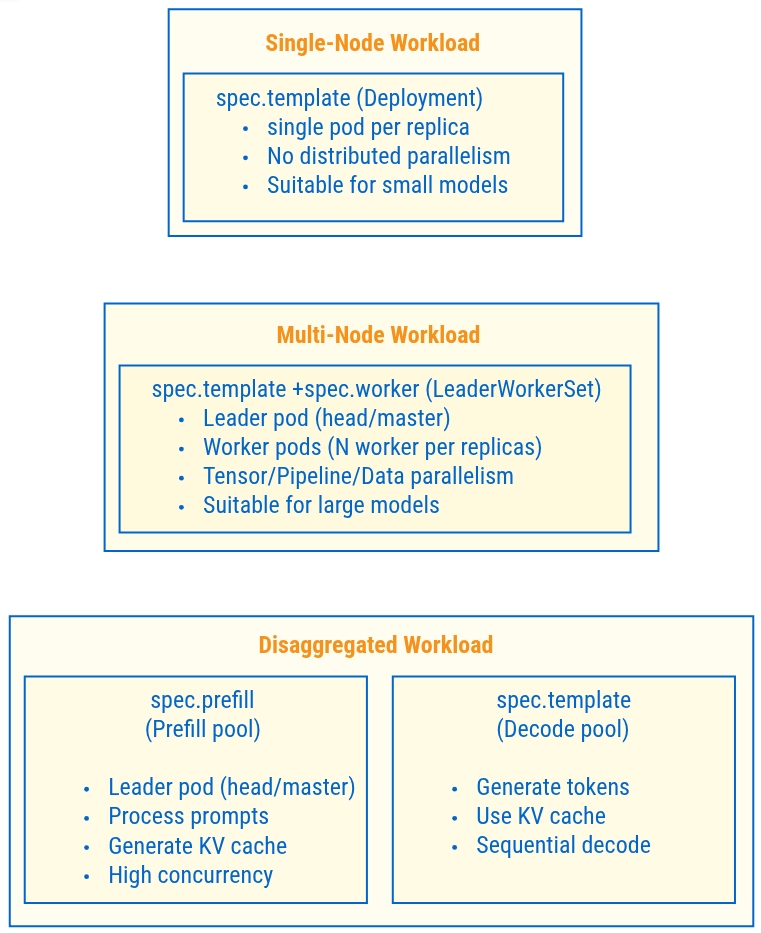
Workload Selection Logic
spec.workerpresent? → Multi-Node (LeaderWorkerSet)spec.prefillpresent? → Disaggregated (Prefill/Decode separation)- Neither present? → Single-Node (Deployment)
Single-Node Configuration
spec:
  replicas: 3
  template:
    containers:
      - name: main
        image: vllm/vllm-openai:latest
        args:
          - "--model"
          - "/mnt/models"
        resources:
          limits:
            nvidia.com/gpu: "1"
            cpu: "4"
            memory: 32Gi
Multi-Node Configuration
spec:
  replicas: 2  # Number of LeaderWorkerSet replicas

  parallelism:
    tensor: 4   # Tensor parallelism degree
    data: 8     # Total data parallel instances
    dataLocal: 4  # GPUs per node
    # Result: 8 / 4 = 2 LWS replicas (overrides replicas: 2 if different)

  template:     # Leader pod spec
    containers:
      - name: main
        image: vllm/vllm-openai:latest
        args:
          - "--model"
          - "/mnt/models"
          - "--tensor-parallel-size"
          - "4"
        resources:
          limits:
            nvidia.com/gpu: "4"
            cpu: "16"
            memory: 128Gi

  worker:       # Worker pod spec (triggers multi-node)
    containers:
      - name: main
        image: vllm/vllm-openai:latest
        args:
          - "--model"
          - "/mnt/models"
          - "--tensor-parallel-size"
          - "4"
        resources:
          limits:
            nvidia.com/gpu: "4"
            cpu: "16"
            memory: 128Gi
Prefill-Decode Separation Configuration
spec:
  # Decode workload (main)
  replicas: 1
  template:
    containers:
      - name: main
        image: vllm/vllm-openai:latest
        args:
          - "--model"
          - "/mnt/models"
          - "--enforce-eager"  # Decode optimization
        resources:
          limits:
            nvidia.com/gpu: "1"
            cpu: "8"
            memory: 64Gi

  # Prefill workload (separate pool)
  prefill:
    replicas: 2
    template:
      containers:
        - name: main
          image: vllm/vllm-openai:latest
          args:
            - "--model"
            - "/mnt/models"
            - "--enable-chunked-prefill"  # Prefill optimization
          resources:
            limits:
              nvidia.com/gpu: "2"
              cpu: "16"
              memory: 128Gi
Use case: Cost optimization, high throughput requirements
Router Specification
The router configuration defines how the service is exposed and how traffic is routed.
Complete Router Configuration
spec:
  router:
    gateway: {}     # Gateway configuration
    route: {}       # HTTPRoute configuration
    scheduler: {}   # Scheduler configuration
Gateway Configuration
Managed Gateway (Default)
spec:
  router:
    gateway: {}  # Empty object = use default gateway
KServe creates a Gateway resource automatically.
Referenced Gateway
spec:
  router:
    gateway:
      refs:
        - name: my-custom-gateway
          namespace: istio-system
Use an existing Gateway instead of creating a new one.
HTTPRoute Configuration
Managed HTTPRoute (Default)
spec:
  router:
    route: {}  # Auto-generated routing rules
Referenced HTTPRoute
spec:
  router:
    route:
      http:
        refs:
          - name: my-custom-http-route
Use an existing, user-managed HTTPRoute instead of having the controller create one. The controller validates that the referenced HTTPRoute exists but does not modify it. This is useful for advanced routing setups like canary deployments or custom traffic splitting.
Custom HTTPRoute Spec
spec:
  router:
    route:
      http:
        spec:
          parentRefs:
            - name: my-gateway
          rules:
            - backendRefs:
                - name: my-backend-service
                  port: 8000
spec and refs are mutually exclusive - use refs to bring your own HTTPRoute, or spec to have the controller create one with your custom rules.
Real-world Use Cases
1. Custom Timeouts (for long-running LLM inference):
spec:
  router:
    route:
      http:
        spec:
          rules:
            - timeouts:
                request: "300s"
                backendRequest: "300s"
2. URL Rewrite (multi-tenant routing):
spec:
  router:
    route:
      http:
        spec:
          rules:
            - matches:
                - path:
                    type: PathPrefix
                    value: /my-tenant/my-model/v1/completions
              filters:
                - type: URLRewrite
                  urlRewrite:
                    path:
                      type: ReplacePrefixMatch
                      replacePrefixMatch: /v1/completions
3. Service Backend (bypass InferencePool):
spec:
  router:
    route:
      http:
        spec:
          rules:
            - backendRefs:
                - group: ""
                  kind: Service
                  name: my-custom-backend
                  port: 8000
Scheduler Configuration
Managed Scheduler (Default)
spec:
  router:
    scheduler: {}  # Auto-configured scheduler
KServe creates:
- InferencePool
- InferenceModel
- Scheduler Deployment (EPP)
- Scheduler Service
Referenced InferencePool
spec:
  router:
    scheduler:
      pool:
        ref:
          name: my-existing-pool
Use an existing, user-managed InferencePool instead of having the controller create one. When a pool ref is provided, the controller does not create an EPP deployment or InferencePool - it only creates an InferenceModel pointing to the referenced pool.
Custom Scheduler with Pool
spec:
  router:
    scheduler:
      pool:
        spec:
          selector:
            matchLabels:
              app: workload
          targetPort: 8000
pool.spec and pool.ref are mutually exclusive - use ref to bring your own InferencePool, or spec to have the controller create one with custom settings.
Parallelism Specification
Defines distributed inference parallelism strategies for multi-node workloads.
Complete Configuration
spec:
  parallelism:
    tensor: 4        # Tensor parallelism (TP)
    data: 8          # Data parallelism (DP)
    dataLocal: 2     # Data-local parallelism (DP-local)
    expert: true     # Expert parallelism (EP)
    dataRPCPort: 8001
Parallelism Types
Tensor Parallelism (TP)
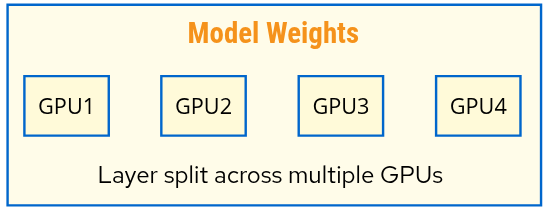
Use case: Model too large for single GPU
spec:
  parallelism:
    tensor: 4  # Split model across 4 GPUs
Data Parallelism (DP)
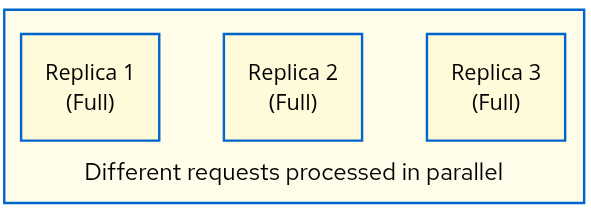
Use case: Increase throughput
spec:
  parallelism:
    data: 16        # 16 total replicas
    dataLocal: 8    # 8 GPUs per node
    # Result: 16/8 = 2 nodes
Expert Parallelism (EP)
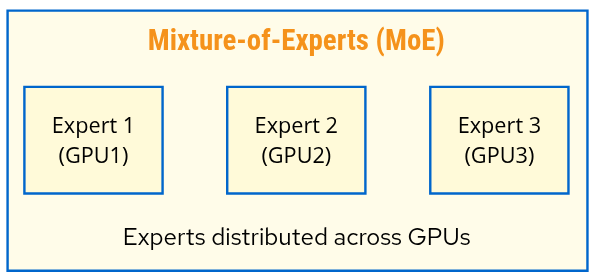
Use case: MoE models (Mixtral, DeepSeek-R1)
spec:
  parallelism:
    expert: true
    data: 16
    dataLocal: 8
LeaderWorkerSet Size Calculation
Multi-Node Size = data / dataLocal

Example:
  parallelism:
    data: 16
    dataLocal: 8

  Result: LeaderWorkerSet.Size = 16 / 8 = 2
          (1 leader + 1 worker per replica)
Complete Configuration Example
Combining all specifications:
apiVersion: serving.kserve.io/v1alpha1
kind: LLMInferenceService
metadata:
  name: llama-70b-production
  namespace: production
spec:
  # Model specification
  model:
    uri: hf://meta-llama/Llama-2-70b-hf
    name: meta-llama/Llama-2-70b-hf
    criticality: High

  # Multi-node workload with data parallelism
  parallelism:
    tensor: 4
    data: 8
    dataLocal: 4

  # Decode workload (main)
  replicas: 2
  template:
    containers:
      - name: main
        image: vllm/vllm-openai:latest
        args:
          - "--model"
          - "/mnt/models"
          - "--tensor-parallel-size"
          - "4"
        resources:
          limits:
            nvidia.com/gpu: "4"
            rdma/roce: "1"

  # Worker pods
  worker:
    containers:
      - name: main
        image: vllm/vllm-openai:latest
        args:
          - "--model"
          - "/mnt/models"
          - "--tensor-parallel-size"
          - "4"
        resources:
          limits:
            nvidia.com/gpu: "4"
            rdma/roce: "1"

  # Router configuration
  router:
    gateway: {}
    route:
      http:
        spec:
          rules:
            - timeouts:
                request: "300s"
                backendRequest: "300s"
    scheduler: {}
Next Steps
- Architecture Guide: Understand how components interact
- Dependencies: Install required infrastructure